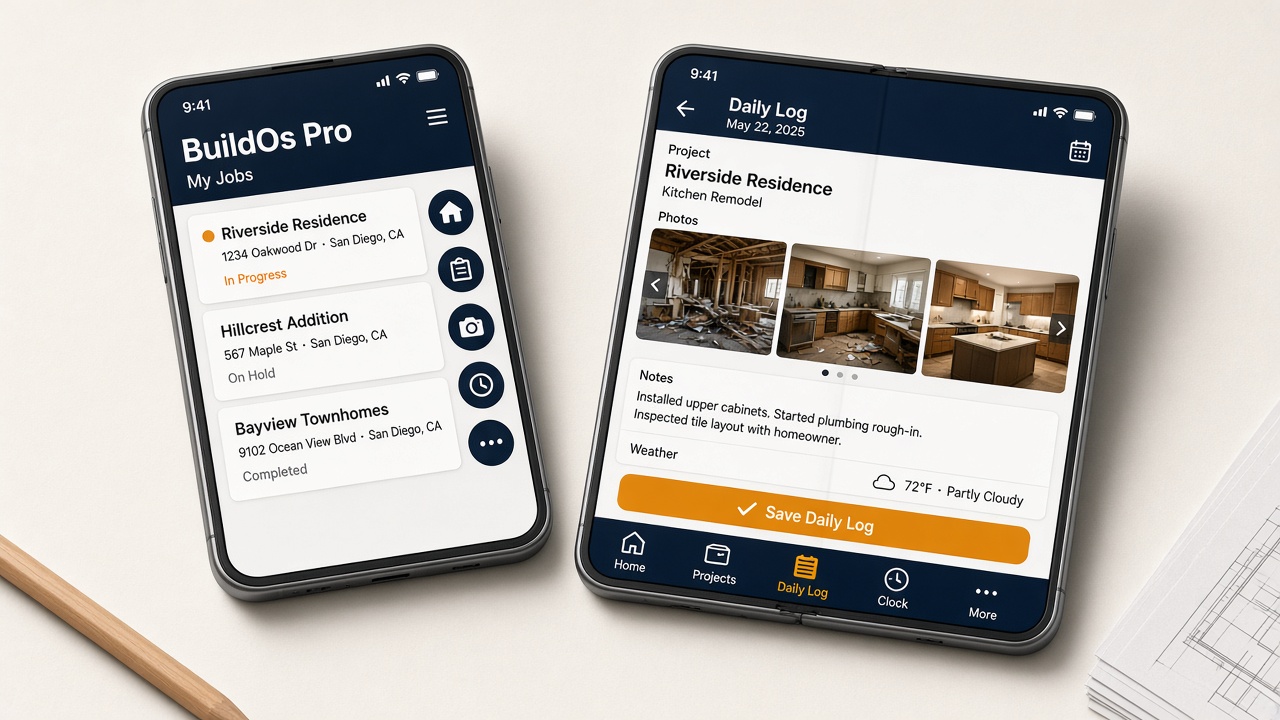
Now on iPhone Duo
BuildOs Pro works on Apple’s folding iPhone
Same company, same login — closed or open. Field work stays on the tabs. Everything else is under More. Wide estimating and books stay easier on a laptop.
- Cover: five icons on the right — Home, Projects, Daily Log, Clock, More
- Open: those same tabs along the bottom, with names
- Daily Logs and Clock on both screens. Touch ID unlocks the phone; BuildOs still uses your email
iPhone Duo is a trademark of Apple Inc. BuildOs Pro is not affiliated with, endorsed by, or sponsored by Apple.

Add BuildOs Pro to this device
BuildOs Pro supports phones and tablets with a mobile version of the platform — no extra app fee. Crew in your plan seats use the same jobs as the office. Subs tap a link; they never buy a seat. Office work stays on a desktop or laptop. Field: photos, daily logs, the clock, and on a LiDAR iPhone Pro in the BuildOs Pro app — Scan this room during Site Walk (not Safari). Same login on every device, including Apple’s folding iPhone Duo — how it works.

Desktop or laptop (Chrome, Edge, Safari)
- Open this page in Chrome or Edge on the computer you’ll use every day.
- If you see the gold Install BuildOs Pro button above, click it.
- Or click the install icon at the right end of the address bar (a screen with a down arrow), then Install.
- On a Mac with Safari: File → Add to Dock.
After install, BuildOs Pro opens like any other app. Start the 30-day trial if you have not already.
iPhone / iPhone Duo / iPad (App Store)
Install BuildOs Pro from the Apple App Store. Same login as the office.
- Tap Download on the App Store above, or search BuildOs Pro in the App Store.
- Install, then sign in with the same email as the office.
Folding iPhone Duo: same login closed or open. How it works on Duo →
Android — Google Play Store
Download BuildOs Pro from Google Play. This is the install for Android phones and tablets.

- Tap Get it on Google Play above, or search BuildOs Pro in the Play Store.
- Install, then sign in with the same email as the office.
- Or, in Chrome: gold Install BuildOs Pro button, or ⋮ menu → Add to Home screen.
Included with Crew, Builder, or Scale. Extra logins $15/mo. Trades and clients on a job link pay nothing.