

The GC or commercial owner has the work. You have the invoice. They pay in 30, 60, 90 days — and Friday payroll does not wait. Advance that unpaid bill so cash hits the shop now, while the receivable is still sitting.
BuildOs Pro
Switch platforms
without weeks of training.
Learning new software is the reason owners stay stuck. BuildOs Pro fixes that: Onboarding Coach moves your jobs, clients, and company data in. Lead Coach qualifies the buyer on the first visit. Then Job Coach walks the job from estimate through extras, collect, scorecard, and close. You do the one next step. Turn Coach off when you know the path.
29 seconds · kitchen walk to a real cost-book estimate

No weeks of training
Lead Coach + Job Coach, or turn them off
No retyping your office
Onboarding Coach imports your data
Site Walk live
Preliminary estimate before you leave
Auto Permit live
6 platforms · auto-draft; you confirm at pay
Get paid now
Advance unpaid invoices inside BuildOs Pro
Pays for itself
Cost Recovery on won jobs
One click for the trade
Tap the link · photo writes the update · done
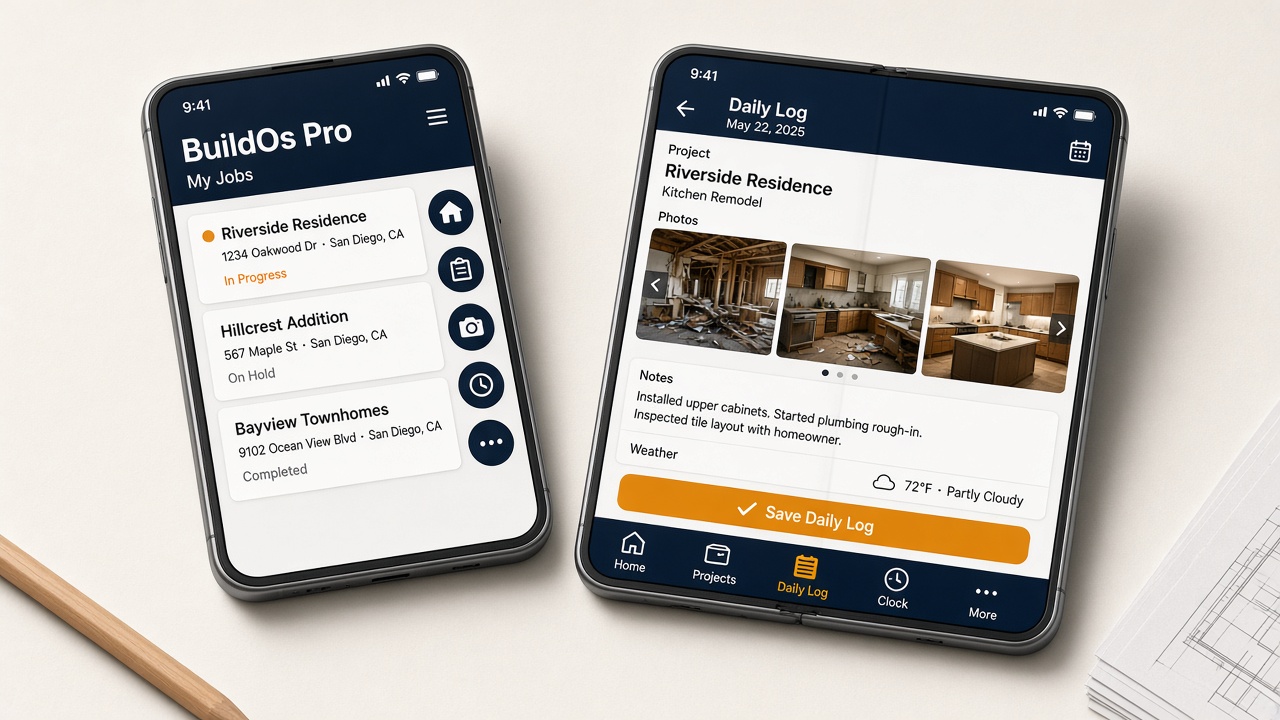
Now on iPhone Duo
BuildOs Pro works on Apple’s folding iPhone
Same company, same login — closed or open. Field work stays on the tabs. Everything else is under More. Wide estimating and books stay easier on a laptop.
- Cover: five icons on the right — Home, Projects, Daily Log, Clock, More
- Open: those same tabs along the bottom, with names
- Daily Logs and Clock on both screens. Touch ID unlocks the phone; BuildOs still uses your email
iPhone Duo is a trademark of Apple Inc. BuildOs Pro is not affiliated with, endorsed by, or sponsored by Apple.
Contractor cash · all 50 states
You already earned it.
Why wait months?
In this economy, Net 30 is often 60 or 90. Payroll is still Friday. BuildOs Pro puts eight cash options on the job you already run so approved shops can access money today — instead of waiting on someone else's accounts payable. Apply in the app. First 30 days free, no card.
You bill homeowners. Their invoice is not a typical business receivable. A revolving line underwrites your shop — bank, books, revenue — so you can draw when materials, labor, or a slow month hit. Draw, repay, draw again.
One lump sum. Fixed payments. Use it for a truck, a crew you cannot float, or the gap between a finished job and the next deposit. You know the payment before you take the money.
The book is full. The account is tight. Take money now against work you are about to bill, and repay as a share of sales as jobs close — not a rigid calendar that ignores how construction actually pays.
The supplier or materials PO is due before the client pays you. Cover that bill so you do not drain the account, miss a materials window, or stall a crew that is ready to work.
Friday is Friday. The receivable lands next month. Make payroll on time so the crew stays, the job keeps moving, and you are not writing a personal check to float someone else's delay.
A GC or commercial buyer wants Net 30 or Net 60. You still get paid. They pay later. This is not the same as homeowner monthly plans on the estimate — that is how the client pays you. This is how you stay whole when a business customer needs time.
A card for materials and job expenses, repaid on your cash cycle — not a personal card that mixes the house with the company. Keep job spend on the job.
Not a filing cabinet
If pictures and a few notes were enough — and the software did the rest — would you subscribe?
Because that is what BuildOs Pro does. This is not a passive app you deposit data into. It is a proactive workstation. You walk the job. You take pictures. You enter the scope. Then BuildOs Pro does the work that used to sit on the estimator, the project manager, the operations lead, the production manager, and the owner.
Most of those estimates will get tossed — typical shops only close about a quarter to a third of what they send. So the draft has to look like a senior estimator wrote it, and it cannot take all day. Photos and notes in. Line items, quantities, forgotten-line suggestions, and a financing button on the proposal you actually send. You review. You send while you are still on site, or the same afternoon.
It builds the estimate. It flags what looks left out. It drafts purchase orders and change orders. It pulls the permit. It schedules crews and shows you the reflow when weather hits. It writes the email. It stamps arrive and leave at the job. You review and approve — you do not retype the week.
- Photos + scope notes → a polished line-item estimate in minutes, not a day — because ~75% of bids never get signed
- Financing on that same estimate — client sees offers in minutes; shops that offer it close more and sell larger tickets
- Permit draft on the city portal — you confirm before pay or submit
- Schedules built, weather risk flagged, crew rematch suggested — you approve the move
- Purchase orders and change-order narratives drafted from the job, not a blank page
- SmartMail writes and files the email. Daily logs write from today’s photos.
- Get paid now sits on the invoice you already sent — cash options while you wait
Win the ones that would have said no
Most estimates never get signed. Stop spending a day on each one.
Typical remodelers and GCs close about 25–30% of the estimates they send. The other 70–75% get tossed — the homeowner shops three bids, the GC already had a number, the job dies. You still have to look like the shop that should win. A thin one-pager loses the ones that would have signed. A day in Excel on every bid burns the ones that will not.
BuildOs Pro is built for that math. Pictures and scope notes in. A super-detailed, line-itemed estimate out — polished enough to send, fast enough that you are not betting a full day on a bid that has a one-in-four chance. You review and send. The ones that die cost you minutes, not a Saturday.
Speed is not sloppy. Industry home-service analyses put same-day estimates around 40–60% close, while quotes that sit three or more days often fall to ~15–20% — roughly a 3× gap from timing alone. An NAHB survey found 70% of homeowners who got a same-day quote said it influenced who they hired.
Then put financing on that same estimate. The client taps Check options. A licensed capital partner can show offers in minutes — a monthly number next to the lump sum. Shops that do this see close-rate lifts in the 18–40% range on jobs over $5,000, and tickets that run about 30% larger, because the homeowner is comparing a payment to a utility bill, not writing a check for the whole kitchen. That is how the client pays you. Different from Get paid now, which is cash to your shop after you already billed.
~25–30%typical close on estimates sent — up to ~75% never become a job
~3×same-day quote vs waiting 3+ days (home-service industry benches)
+18–40%close-rate lift when a monthly payment sits on the quote
Find your path
Explore BuildOs by trade, competitor, and guide
Deep pages for remodelers, TI shops, WA permits, and how we compare to Jobber and Buildertrend.
Audiences
Who BuildOs is for
Remodelers, builders, TI, trades, GC partners, Washington shops.
Compare
vs Jobber, Buildertrend & more
Side-by-side pages for the stacks contractors already know.
Guides
Site walk, permits, estimating
Practical how-tos for the spine from walk to bid to permit.
Washington
Seattle · Tacoma · Eastside
Local hubs plus Auto Permit on six WA platforms.
Product
AI Estimating
Scope to itemized draft your estimators can finish.
Product
Trade-Aware Scheduling
Crew schedules that survive weather and change orders.
Invite
One click for the trade
They tap the link. Photo writes the update. You see Ready to pay. They never buy a seat.
For trades
One click. Done.
Camera opens. Photos save themselves. Get paid faster. Tell the next builder.
Cash flow
Get paid now
Eight cash options while you wait — invoice advance, credit line, loan, payroll, vendor bills, shop card. Apply inside BuildOs Pro.
Marketplace
Approved & embedded partners
Get paid now, funding on the estimate, ABC Supply, Thumbtack, QuickBooks. Apply to be listed.
The switching problem — solved
Three coaches. One smooth move.
Other platforms dump you into empty menus and a 40-page help center. BuildOs Pro walks you in, qualifies the buyer, then walks the job through collect and close. Turn a coach off when you no longer need it.
Step 1 · First login
Onboarding Coach
Built for the pain of leaving Buildertrend, Jobber, CoConstruct, ContractorTools, QuickBooks job lists, or spreadsheets. You should not manually re-enter emails, customers, or open jobs.
- Pick your old system — we pre-map the CSV columns
- Import projects, clients, and company branding
- Connect QuickBooks and invite your team
- Optional Data Rescue help during your free trial
Step 2 · New buyer
Lead Coach
First call, site visit, then go or no-go. A bad budget fit never becomes a project.
- Confirm contact and schedule the walk on the lead
- Go converts to a project — Job Coach starts
- No-go marks lost. No fake job in your board
Step 3 · Every job after that
Job Coach
You do not memorize BuildOs. Open the job. Do the amber step. After Lead Coach converts a real buyer, Job Coach walks estimate → contract → deposit → permits → build → invoice extras → punch → collect → scorecard → warranty → close → frozen scorecard + review.
- Kitchen, bath, addition, and ADU tip packs
- One next action — not a wall of tabs
- Hide the tips, or turn Coach off for that job
- Approved extras and hours become invoices — sold is not cash until you collect
Nobody else offers this
BuildOs is overhead.
We recover it for you.
Contractors already build profit and overhead into every job. Cost Recovery treats your subscription the same way — automatically, on won volume.
Builder $299/mo ≈ 0.4% of won volume
Example: 10 estimates/mo · 30% win · $25k average → about $100 per job you win. Shortfalls catch up next month. T&M skipped.
Invisible or clear
Folded into markup, or shown as Project Administration — never “software fee.”
On by default
Starts working day one. Flip off anytime from company settings.
Keeps score
Win-rate aware math with a hard cap so bids never look wrong.
The part no one else has built · Site Walk Recorder now live
Eighteen employees.
Built right in.
Meet your BuildOs Bots — eighteen roles that work around the clock, never miss, and never hit your payroll. A production manager alone runs $150–200K a year. BuildOs Pro comes with an entire crew built into the platform. This is why builders don't just save money switching. They run leaner.

The Estimator
Does the work of a $60–90K estimator
Photos → itemized draft you review
Walk the job, take pictures. That's the input.
The AI turns your site-walk photos and scope into a fully itemized estimate draft — line items, quantities, the works. It takes a few minutes, not a finished bid in a blink. You review, adjust, and send. What took your estimator a day happens before you're back in the truck.

The Site Walk Recorder
Walk once. Talk once. Preliminary estimate before you leave
Send a same-visit draft while you’re still on site
No $200 necklace. No waiting three days. No lost emotional momentum.
Inside BuildOs Pro you start one recording and walk the whole job — home or place of business — talking measures, materials, and damage while you snap photos. On an iPhone Pro with LiDAR, tap Scan this room in the BuildOs Pro app (not Safari) to fill floor SF, height, and walls. Tape leftover cabinets, counters, and shower. The shutter never stops the mic. AI turns the walk into structured scope, and the walk photos go into the same photo-estimate job you review, price, and email as a preliminary estimate before you leave the driveway. You look organized, prepared, and in command — and the client has a number while the conversation is still warm.
Why speed wins: industry analyses of home-service close rates put same-day estimates around 40–60%, while quotes that take 3+ days often fall to ~15–20% — roughly a 3× difference from timing alone. An NAHB survey found 70% of homeowners who got a same-day quote said it positively influenced who they hired. No other construction platform builds continuous in-app site-walk voice and photo capture into that same-visit estimate send.

The Permit Manager
Ends the permit chase that steals your week
Sold job → city portal draft, watched for you
Logging into six city portals. Re-keying the same job. Missing corrections until the city calls.
After estimate + contract (+ deposit when required), Permit Manager auto-drafts on all six WA platforms — Seattle SDCI, MyBuildingPermit, Tacoma Accela, eTRAKiT, SmartGov, and EnerGov — when that portal login is connected and the worker is up. Each job shows readiness: login, worker, polling, and whether the city page needs a selector recapture. Seattle is the strongest; other cities are often draft-assist until proven. When the city issues the permit, that fact is stamped on today's daily log and the client portal. You confirm before pay or submit — city fees stay with the city, and BuildOs never stores your card.

The Bookkeeper
Does the work of a $45–60K bookkeeper
Snap a receipt → it's a job cost
No more shoebox. No more manual entry.
Photograph a receipt and the AI reads it — vendor, items, amounts. It suggests the job you're on (or the last one you used). You confirm the project, then it files as a job cost. Approved extras, signed T&M, milestones, and approved hours draft a client invoice so the extra is actually billed. If QuickBooks is connected, send and record-payment try to push the invoice and the payment there. Your real spend and the scorecard land in real time, not at month-end when it's too late to do anything about it.

The Scheduler
Half a production manager's week, handled
Weather risk flagged — you approve the reflow
Proactive, not reactive.
The AI builds project schedules and your master schedule, then watches the weather. When rain or wind hits upcoming work, it nudges you on the dashboard with a preview. You apply the remapping — dates do not move by themselves. The thing a production manager spends half their week on, handled — with you still in charge of the calendar.

The Dispatcher
The dispatch puzzle, off your plate
The right crew on the right work
Who do I send where? Handled.
The AI matches the right crew and the right sub to each phase — by trade, workload, and the coverage zips you set. You review the suggestions before anyone is assigned. You're not the bottleneck, and nobody's standing around on the wrong job.

The Timekeeper
The forgotten punch that used to cost you the invoice
Arrive the job — clocked. Leave — clocked.
Friday night reconstructing who was where. Hours that never made the invoice. The homeowner fighting every T&M line because nobody can prove the time.
Field crews forget to clock in. They forget to clock out. They bounce to the next house and the timesheet is fiction by lunch. That chaos hits the office — wrong job costs, messy payroll, and a client who pushes back on T&M and extras because the hours look made up. The Timekeeper draws a geofence around the job address — a quiet little fence the phone can see. Walk on site and hours start. Leave for the next job or for home and they stop. Optional travel between jobs, if you bill it, is a company setting you set once. Those who/hours also feed today's daily log — a PM still approves before Margins or a client bill. The crew does not punch. The hours that can be billed actually get captured — automatically.

The Pricing Analyst
Market-real pricing no competitor offers
It knows what things really cost
Not a generic price book. Real prices.
Today the AI learns your real prices from receipts, sub bids, and accepted estimates — so new bids are built on numbers you already paid, not a generic book. And as more Seattle-area builders join, those numbers pool into anonymized regional benchmark pricing — what materials and labor truly cost in this market. Stop leaving money on the table on every bid. No platform offers this.
It doesn't stop at the line item. The AI also learns what entire projects really cost from real completed jobs — a kitchen remodel, a master bath, an addition — and references those real-world totals when you estimate a similar job. So you're not just pricing a 2x4 right. You're checking your whole bid against what this market actually pays — and it sharpens with every project logged.

The Submittal Reviewer
Catches the 30–40% rejection rate before it costs you
Submittals checked before they bounce
Commercial. The rejection nobody sees coming.
Attach the package PDF. Before it reaches the architect, the AI reads that file against the spec section and flags what will get it rejected — missing data, wrong product, gaps. You still hit send. Industry submittal rejection runs 30–40%, and every bounce is a one-to-two-week delay. Procore and the rest just store your submittals. None of them check yours before it costs you the schedule.

The Change-Order Writer
Stops unbilled change-order work cold
Change orders that write themselves
The unbilled work that quietly eats your margin.
From the RFI answer or the signed T&M ticket, the AI drafts the change-order narrative as soon as the draft CO is created — scope, justification, and basis. You still price it and send it. Forgotten or thinly-written COs are work you did for free. Every other platform makes you write these by hand — so they go out late, weak, or never.

The Field Clerk
Writes the record that protects you in a dispute
Snap photos → today's daily log, written
The record that protects you — actually written.
A few site photos become a clean, written daily-log narrative — one log per job per day. The AI looks at today's pictures and yesterday's (what changed), then writes the work. More photos later the same day update that same draft. You review before the client sees it. It does not invent trades or finished rooms that aren't in the photos. Everywhere else it's manual typing at the end of a 12-hour day, which means it doesn't get done. Here it does.
And it doesn't get forgotten. Toward the end of the day, each job's assigned lead — not the whole crew — gets a reminder: have today's logs been updated? Yes opens the jobs that still need notes, updates, and photos. Quiet day? Tap No work today or No updates on this project and you're covered. No nagging the whole team. No blank days that come back to haunt you.

The Handoff Coordinator
Guards the gap where scope disappears
Nothing sold gets lost in the handoff
Where scope silently disappears.
When a sold job moves into production, the AI drafts the handoff notes and the platform flags a red warning if the packet is incomplete — it does not hard-block the move. You still own the handoff. The sale-to-build gap is where the money you sold goes missing. This makes that gap visible.

The Client Liaison
Prevents the anxious client phone call
Client updates, written for you
The follow-up that keeps clients calm.
Each week the AI turns the job's real activity into a warm, homeowner-friendly progress update you review and post to the client portal — daily logs you chose to share, official facts like a permit issued, schedule progress. It does not send itself. Internal notes stay off the portal. The communication that prevents the anxious phone call — handled. Other platforms give the client a dashboard and call it communication. This actually talks to them.

The Estimate Assistant
Finishes the estimate you started
Suggests the lines you'd forget
The line items that slip through and eat your margin.
On a draft that already has lines, tap Find forgotten lines — demo, dumpster, prep, cleanup, and finish work you'd catch on your third read-through. Add or skip each one. Empty drafts still get a full AI Suggest start. Every suggestion is yours to accept or ignore.

The Bid Reader
Turns a sub's PDF bid into priced line items
Vendor bids → your pricing, instantly
Retyping a sub's bid line by line. Every time.
Drop in a supplier or subcontractor bid PDF and the AI reads every priced line — description, quantity, unit, cost — into CostPulse (your pricing intelligence), not onto an open estimate. What you used to key in by hand becomes real cost data the moment it lands.

The Migrator
Brings your data over — free
Your old platform's data, imported
The reason people feel trapped where they are.
Start with a project CSV — the AI maps columns into BuildOs Pro. Clients and cost lists can follow. Safety Vault export is there when you leave. Your data is yours. Moving it in is free, and moving it out always will be.

The Log Writer
Upload photos. That's the whole job.
Upload today's photos → the full daily log, written
The end-of-day writing nobody wants to do.
All the crew does is upload today's site photos. The Log Writer writes the full daily log from those pictures. It looks at yesterday's photos, sees what actually changed, and updates today's record to match — progress, not a copy of yesterday. No typing required. You still glance at it before the client sees it. Upload. It writes. That's it.

The Web Builder
Writes your website copy
Your site, written for you
The website you never had time to write.
The AI writes professional website copy for your company — the words that make you look like the builder you are, without hiring a copywriter or staring at a blank page. Part of the growth tools built to help you land the next job, not just run the current one.
The AI does the heavy lifting — you stay in control. Every estimate, cost, and schedule change is yours to review and approve.
Your data is yours. Period.
The regional pricing pool is prices only — fully anonymized. No company's spending, jobs, clients, or private data is ever in it. And BuildOs Pro will never sell or share your information with anyone, for any reason. We don't make money on your data, and we never make money on your inconvenience.
Anti-gouging math
Same job. Far less software tax.
Published competitor rates for a small crew — before their add-ons, per-user meters, and “call sales” markups. BuildOs Pro includes the tools others sell separately.
| Platform | Typical monthly | What you get | The catch |
|---|---|---|---|
| BuildOs Pro Crew · Builder · Scale |
$199–$499flat · live jobs + seats | Full OS + SmartMail + Auto Permit tools + CostPulse estimating + Cost Recovery | Mobile version of the platform on phone and tablet · trades on a link never buy a seat · extra logins $15/mo · no module upsells |
| Jobber Grow team plans |
~$299–$3995–10 users · monthly | Field service CRM / scheduling / invoicing | Price climbs with headcount; AI & marketing add-ons extra; no Cost Recovery |
| CoConstruct Essential / Advanced |
~$339–$499after short intro | Builder / remodeler PM + selections | Intro rates expire; folding into Buildertrend; estimating depth varies by plan |
| Buildertrend volume quote |
~$500–$800+often $8–10k/yr | Full residential builder suite | No published price — sales quote tied to your volume; renewal surprises common |
| Houzz Pro Essential+ |
~$400–$500+annual equiv. | CRM + marketing + project tools | Marketing-led stack; deeper ops often means higher tiers |
| Procore enterprise |
$667+entry · custom above | Enterprise construction management | Built for big GCs — overkill (and overpriced) for most shops |
Competitor figures are approximate public / third-party rates as of 2026 and change without notice. BuildOs prices are the live Stripe rates on this page — always significantly lower, not just for an intro period.
The BuildOs family
On Pro, everything below is included.
Crew, Builder, and Scale all include SmartMail, Auto Permit tools, and CostPulse estimating — no extra monthly fees. Standalone prices are only if you want a single tool without the full OS (or an API-only seat).
Full platform · best value
BuildOs Pro
The construction operating system — estimating through closeout in one login. Every feature on every tier; you only step up when you need more live jobs at once or more seats. SmartMail, Auto Permit, and CostPulse are included — not add-on invoices.
- AI estimating, proposals, e-sign contracts
- Scheduling, weather reflow, client portal
- Crews, job costing, change orders, invoices, Job Scorecard
- Supports phone and tablet with a mobile version of the platform — no extra app fee. Trades collaborate on a link; they never buy a seat
- Cost Recovery on by default · Safety Vault™ export when you leave
Email → scope
SmartMail
Job-linked email that becomes living estimate scope. Connect Gmail or Outlook, triage what matters, match to jobs, reply from your real address — then call it from your own CRM later via API.
- Inbox + sent sync with attachments
- AI triage and job matching
- Scope rolls into estimates · API + webhooks
Permitting
Auto Permit
Auto-draft on all six WA platforms — Seattle SDCI, MyBuildingPermit, Tacoma Accela, eTRAKiT, SmartGov, and EnerGov. Flat monthly, not $25–$100 per filing. City fees stay with the city. You confirm before pay or submit.
- All 6 platforms live for auto-draft when connected
- Human confirm before pay / submit (pay path still rolling out)
- No card numbers stored in BuildOs
Construction intelligence · API add-on
CostPulse
Not a click-and-bid app by itself. CostPulse is a cost-intelligence layer for software you already use — via API — or fully inside BuildOs Pro. It learns real unit costs and serves them so pricing isn’t guessed.
- For developers / CRMs: rates API into your existing stack
- For BuildOs Pro shops: included — photo/scope uses your book
- Non-developers who need screens: choose BuildOs Pro, not API-only
Bundle · no Pro required
Office Automation
SmartMail + Auto Permit together for shops that aren’t ready for the full OS — or want a second seat for the office alone. On Pro you already have both; this bundle is the à-la-carte path.
- Everything in SmartMail
- Everything in Auto Permit
- One invoice · one cancel
Pro subscribers: use SmartMail, Auto Permit, and CostPulse inside the app — no separate Stripe add-on. Standalone checkout is for non-Pro buyers. City permit fees are always paid to the jurisdiction.
One click · done · free for the trade
One click. Done. That is why a sub uses the link.
They will not fill out a portal for you. They will tap a text: camera opens, photos save themselves, waiver is a name and a check. That one click writes today’s job update, their scope, and Ready to pay. You already pay for Pro. They never buy a seat.
Why a GC invites
Photos, insurance, and a waiver used to live in texts. You paid anyway and hoped the proof showed up.
- Today’s photos write the daily log and the trade’s scope — the owner sees the update
- Waiver + photos = Ready to pay — you are not guessing
- COI lands on their file (or is already there from another builder)
- They see only this job — not your books
Why a trade actually uses it
They use it because it puts money in their pocket and proof in their pocket — not because you asked nicely.
- One click and done — tap the link, take the photo, put the phone away
- Get paid faster — that is the only extra they will do
- Keep photo proof if anyone argues later (warranty, extras, “you never showed”)
- Insurance once — the next GC who invites the same email already has it
- Free forever for the trade. No CompanyCam seat. No Fieldwire seat.

Why BuildOs exists
35+ years of being gouged.
That ends here.
I’ve paid the inflated software bills, the nickel-and-dime add-ons, the “loyalty” renewals that only go up. BuildOs is the anti-gouging answer: multiple products, lean overhead, prices that stay significantly lower — not for a honeymoon month, for good.
— Roy Dean, founder · BuildOs Pro
See us on Google Play and the Apple App Store
Supports phone and tablet
BuildOs Pro supports phones and tablets with a mobile version of the platform. Android crews install it from Google Play and iPhone crews from the App Store — same jobs as the office. No extra app fee. Invite a trade from the job: they tap a link, the camera opens, and waiver + photos means ready to pay. They never buy a seat.

 Android · Google Play
 iPhone · App Store
Run it on a real job.
Create your account → pick Crew, Builder, or Scale → 30 days free, no card required. You only pay when the free month ends and you choose to become a BuildOs member. We never store credit cards or payment methods in BuildOs Pro. Auto Permit (6 platforms), SmartMail, and CostPulse are included on every Pro plan.