Every way BuildOs Pro
gets ahead of your day.
If pictures and a few scope notes were enough — and the software did the rest — would you subscribe? That is BuildOs Pro: a workstation, not a filing cabinet. This page is every pain in a builder's week, and how the platform answers it. All of it included, at every tier.
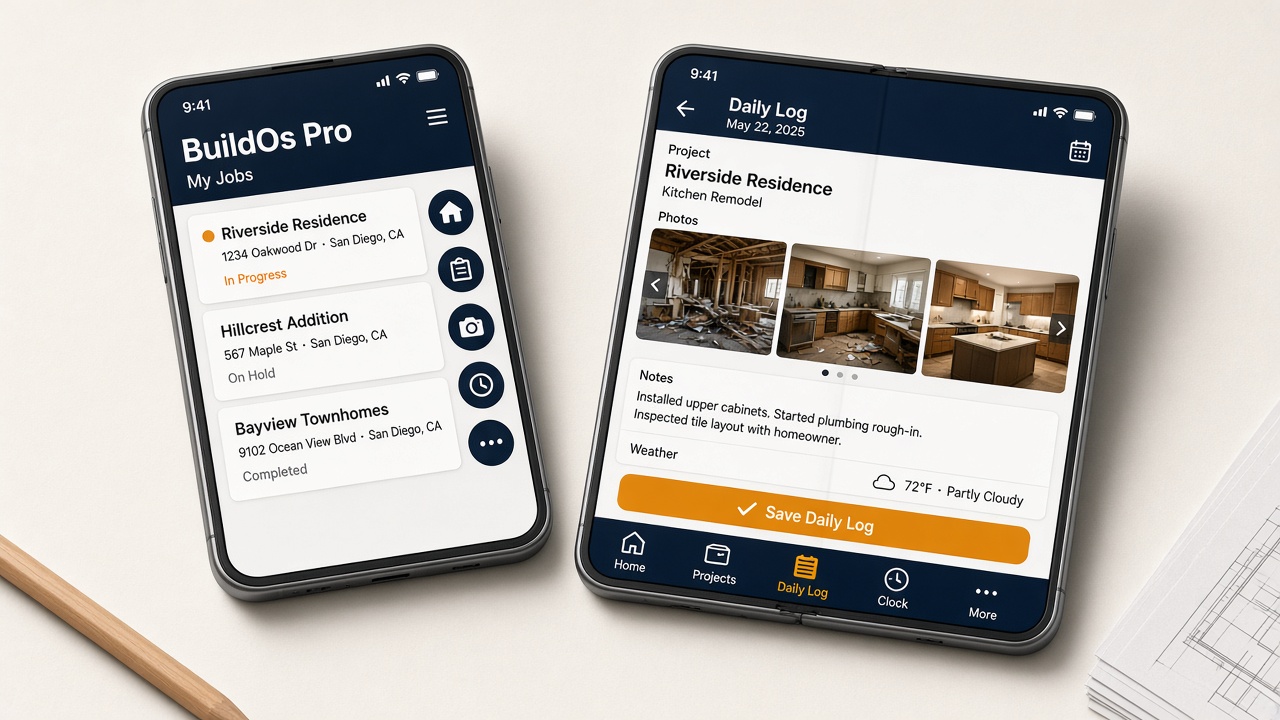
Now on iPhone Duo
BuildOs Pro works on Apple’s folding iPhone
Same company, same login — closed or open. Field work stays on the tabs. Everything else is under More. Wide estimating and books stay easier on a laptop.
- Cover: five icons on the right — Home, Projects, Daily Log, Clock, More
- Open: those same tabs along the bottom, with names
- Daily Logs and Clock on both screens. Touch ID unlocks the phone; BuildOs still uses your email
iPhone Duo is a trademark of Apple Inc. BuildOs Pro is not affiliated with, endorsed by, or sponsored by Apple.
The three no one else has
The proactive core.
$31B in rework a year traces to lost information between sale and build.
A gated sold→building ceremony no job can skip — exclusions, promises, risk ownership, client story, firm number, all carried to the field before the crew arrives. Nothing reaches the crew until the knowledge does.
Weather delays 45% of projects — and you usually find out too late.
The schedule watches the forecast and re-flows the work before the delay hits — moves only what's genuinely blocked, notifies subs and crews, protects the client's committed date, logs the weather delay.
Most estimates get tossed. You cannot spend a day on each one — and a thin bid loses the ones that would have signed.
Typical shops close about 25–30% of estimates they send — up to ~75% never become a job. Photos → a polished line-item draft, grounded in a real cost book + your own rates, kept live-accurate by CostPulse. Financing sits on that same estimate — client offers in minutes. Same-day quotes close far more than ones that sit three days. Dollars come from catalog and learned rates — not invented.
And everything else a builder's week needs
The rest of the platform.
"Another $299/mo tool? My margin can't take it."
Turn on cost recovery and BuildOs spreads your subscription across won estimate volume (win-rate aware, with monthly catch-up). Folded into markup or a normal Project Administration line — never labeled as software. At a typical win rate it's tenths of a percent. T&M / cost-plus jobs are skipped automatically.
"Who's idle this week? Who can I promise a start to?"
A people-first board showing every crew member across every day — the open days jump out so you fill lost time, and a pipeline view shows how far out you're booked. A job that is booked but not allowed to start shows Blocked, with the open gate named: deposit, permit, materials, or subs.
"The office heard the client. The lead showed up with a schedule line."
On day one the crew opens What we sold: the finished site walk, what is not in the price, the room measures, and the photos. A walk still recording does not appear.
"We ran long on tile again, and the next bid used the same hours."
Closing a job remembers labor lines where the logged hours differ from the estimate. The next similar draft asks. Yes copies the hours. It does not change the price.
"The basement killed the signal halfway through the walk."
After the walk has started, voice, photos, and the room scan stay on the phone and send when the signal comes back. Finish waits until that upload is done.
"Clients texting for updates all day pulls my PM off the work."
Each client gets a live Build Record — their schedule, committed date, an honest on-track/behind badge, proposals and approvals — so they self-serve the answer instead of calling you.
"By the time I see the overage, the money's already spent."
Set a Do-Not-Exceed ceiling per line and BuildOs tracks real spend against it from time entries and costs in real time — visible to your team, never the client. You see the overrun coming, not after.
"Early change orders make clients feel hustled."
A preliminary estimate to proceed, then a firm number dialed in at the pre-con walk and signed before work starts. Change orders are reserved for genuine scope changes — the way trust is built.
"Verbal yeses I never got in writing cost me every year."
On the job, Found something saves a photo and a draft at zero dollars. The office prices it and emails the client. The extra starts after that yes. Scope changes stay documented, client-approved change orders.
"The invoice is sitting. Payroll is Friday. I have been shopping lenders."
In this economy, waiting months for money you already earned is the expensive option. BuildOs Pro puts eight cash tools on the job: advance an unpaid business invoice, line of credit (including shops that bill homeowners), term loan, revenue-based cash, cover a vendor bill, cover payroll, net terms for a business customer, and a shop card. Apply in the app. A licensed capital partner funds approved requests. See every option and why.
"Double-entering everything into QBO wastes hours."
Receipts and costs flow to a review queue and post straight into QuickBooks — no double entry, no month-end scramble.
"A sub's lapsed insurance nearly took down my company once."
Track every sub's certificate of insurance and get alerted before it lapses — the exposure that can end a business, watched for you.
"I don't want every employee seeing margins and financials."
Nine roles from owner to sub to client, each seeing exactly what they should — financials gated, projects scoped, the right people on the right data.
"I don't want my personal number on every job site."
An in-app texting line with consent tracking and a proof trail — reach clients and crews without handing out your personal cell.
"Chasing permits is a part-time job by itself."
Auto-draft on Seattle SDCI, MyBuildingPermit, Tacoma Accela, eTRAKiT, SmartGov, and EnerGov. You confirm before pay or submit — city fees stay with the city.
"Crew hours never make it onto the right job."
Crew members log time against the job and it flows straight into that job's costs — real labor cost, in real time, no transcription.
"Restoration carriers live in Xactimate. I live everywhere else."
Upload an Xactimate .esx — during beta our team hand-verifies the import (concierge). Instant self-serve import ships after beta.
Half the price, none of the lock-in
Switching is the scary part.
We make it safe.
Every feature on this page is included at every tier — no gates, ever. Migration help is available, and you can download your Safety Vault™ anytime from Subscription — projects, estimates, clients, contracts, and SmartMail index. You own your data, forever.