“Help me set up my first job.”
Asks one question at a time — job name, address, type — then shows the new job for you to approve.
BuildOs Pro
The work around the work. Done!
New · Ask BuildOs
You know construction. We'll handle the software.
Ask BuildOs is the voice assistant for BuildOs Pro. Hold the talk button and say it the way you'd tell your office manager: "What's on tomorrow's schedule?" · "Write today's daily log." · "Add fifteen percent more drywall on the Smith estimate." It answers from your jobs, or gets the work ready and waits for you to approve it.
Ask BuildOs · example conversation

Ask BuildOs · how it works
No commands to memorize and no menus to hunt through. Talk the way you talk on the job — or type it.
Say it like you'd say it to your office manager. Let go when you're done.
Ask a question and it answers from your records, with where it found it. Ask for work and it prepares it.
Nothing changes until you tap Confirm. Saying "yes" out loud doesn't count.
Real construction workflows
“Help me set up my first job.”
Asks one question at a time — job name, address, type — then shows the new job for you to approve.
“Write today's daily log.”
Drafts the log from what you say (and a photo if you add one). You tap Confirm before it saves to the job.
“Help me revise this estimate.”
Prepares the change — "add 15% more drywall" — and shows old and new quantities. A sent estimate becomes a new draft revision.
“Show me tomorrow's crew schedule.”
Reads tomorrow's tasks and crews from your schedule and says where it got the answer.
“Prepare an update for my customer.”
Writes a draft customer update for you to read and edit. It never sends anything by itself.
Advisor engagement · $3,500 value
This is not a free AI report. It is the kind of company diagnostic a fractional CFO or turnaround advisor sells — prepared with BuildOs construction scorecard engines and Claude by Anthropic for the executive narrative — then walked with you personally.
Company health score and plain-English verdict from your files.
Cash pressure and 13-week runway shape before a crunch surprises you.
Where collections drag and how much working capital is stuck.
Earned vs billed — money already worked that never hit an invoice.
Jobs that looked fine at estimate and slipped as costs landed.
Which work makes money and which types quietly lose it.
Whether overhead and shared costs make your profit map trustworthy.
Labor and overtime patterns that erode margin on the job.
Office and indirect cost growth relative to the work you sell.
P&L plus supporting files (AR, WIP, job cost when you have them).
Construction scorecards compute the numbers from your upload — evidence-traced.
Claude by Anthropic drafts the executive narrative and priorities after the engines run.
You walk the Owner briefing with a specialist — software prepares; professional decides.
What you walk away with
Accountants, CPAs & bookkeepers: Firm Portal is built for your practice — see how firms make money → · Firm login
Optional: BuildOs Pro helps execute the fix plan (billing, COs, daily logs, job cost) — start a free trial if useful. The Scan stands alone.
Every finding traces to uploaded files. Not a bank attestation or tax opinion. A specialist follows up personally.
Partners · capital · advisors
Dedicated landings for the people who fund growth and the firms that already serve remodelers and GCs. Same BuildOs product spine — clear next step for each audience.
Firm Portal
We assemble Company Health Scans. You advise and keep the fee. Free team logins, $49 prep, Monitor, partner commissions.
Open firm landing →Firm login
Already registered? Open the multi-client dashboard, sample scan, and draft → release workspace.
Firm Portal login →Investors
Live product, expanded revenue streams (Pro · standalones · Health Scan · Firm Portal), downloadable deck and QR.
Open investor landing →Available now · the technology inside BuildOs Pro
Meet your BuildOs Bots — eighteen specialized AI tools for estimating, site walks, permits, scheduling, bookkeeping, change orders, daily logs, and more. They are in BuildOs Pro today. A production manager alone runs $150–200K a year; these come with the platform. Ask BuildOs is the voice in front of them: you say what you need, and the right tool does the work.

Walk the job, take pictures. That's the input.
The AI turns your site-walk photos and scope into a fully itemized estimate draft — line items, quantities, the works. It takes a few minutes, not a finished bid in a blink. You review, adjust, and send. What took your estimator a day happens before you're back in the truck.

No $200 necklace. No waiting three days. No lost emotional momentum.
Inside BuildOs Pro you start one recording and walk the whole job — home or place of business — talking measures, materials, and damage while you snap photos. On an iPhone Pro with LiDAR, tap Scan this room in the BuildOs Pro app (not Safari) to fill floor SF, height, and walls. Tape leftover cabinets, counters, and shower. The shutter never stops the mic. AI turns the walk into structured scope, and the walk photos go into the same photo-estimate job you review, price, and email as a preliminary estimate before you leave the driveway. You look organized, prepared, and in command — and the client has a number while the conversation is still warm.
Why speed wins: industry analyses of home-service close rates put same-day estimates around 40–60%, while quotes that take 3+ days often fall to ~15–20% — roughly a 3× difference from timing alone. An NAHB survey found 70% of homeowners who got a same-day quote said it positively influenced who they hired. No other construction platform builds continuous in-app site-walk voice and photo capture into that same-visit estimate send.

Logging into six city portals. Re-keying the same job. Missing corrections until the city calls.
After estimate + contract (+ deposit when required), Permit Manager auto-drafts on all six WA platforms — Seattle SDCI, MyBuildingPermit, Tacoma Accela, eTRAKiT, SmartGov, and EnerGov — when that portal login is connected and the worker is up. Each job shows readiness: login, worker, polling, and whether the city page needs a selector recapture. Seattle is the strongest; other cities are often draft-assist until proven. When the city issues the permit, that fact is stamped on today's daily log and the client portal. You confirm before pay or submit — city fees stay with the city, and BuildOs never stores your card.

No more shoebox. No more manual entry.
Photograph a receipt and the AI reads it — vendor, items, amounts. It suggests the job you're on (or the last one you used). You confirm the project, then it files as a job cost. Approved extras, signed T&M, milestones, and approved hours draft a client invoice so the extra is actually billed. If QuickBooks is connected, send and record-payment try to push the invoice and the payment there. Your real spend and the scorecard land in real time, not at month-end when it's too late to do anything about it.
Proactive, not reactive.
The AI builds project schedules and your master schedule, then watches the weather. When rain or wind hits upcoming work, it nudges you on the dashboard with a preview. You apply the remapping — dates do not move by themselves. The thing a production manager spends half their week on, handled — with you still in charge of the calendar.

Who do I send where? Handled.
The AI matches the right crew and the right sub to each phase — by trade, workload, and the coverage zips you set. You review the suggestions before anyone is assigned. You're not the bottleneck, and nobody's standing around on the wrong job.

Friday night reconstructing who was where. Hours that never made the invoice. The homeowner fighting every T&M line because nobody can prove the time.
Field crews forget to clock in. They forget to clock out. They bounce to the next house and the timesheet is fiction by lunch. That chaos hits the office — wrong job costs, messy payroll, and a client who pushes back on T&M and extras because the hours look made up. The Timekeeper draws a geofence around the job address — a quiet little fence the phone can see. Walk on site and hours start. Leave for the next job or for home and they stop. Optional travel between jobs, if you bill it, is a company setting you set once. Those who/hours also feed today's daily log — a PM still approves before Margins or a client bill. The crew does not punch. The hours that can be billed actually get captured — automatically.

Not a generic price book. Real prices.
Today the AI learns your real prices from receipts, sub bids, and accepted estimates — so new bids are built on numbers you already paid, not a generic book. And as more Seattle-area builders join, those numbers pool into anonymized regional benchmark pricing — what materials and labor truly cost in this market. Stop leaving money on the table on every bid. No platform offers this.
It doesn't stop at the line item. The AI also learns what entire projects really cost from real completed jobs — a kitchen remodel, a master bath, an addition — and references those real-world totals when you estimate a similar job. So you're not just pricing a 2x4 right. You're checking your whole bid against what this market actually pays — and it sharpens with every project logged.

Commercial. The rejection nobody sees coming.
Attach the package PDF. Before it reaches the architect, the AI reads that file against the spec section and flags what will get it rejected — missing data, wrong product, gaps. You still hit send. Industry submittal rejection runs 30–40%, and every bounce is a one-to-two-week delay. Procore and the rest just store your submittals. None of them check yours before it costs you the schedule.
The unbilled work that quietly eats your margin.
From the RFI answer or the signed T&M ticket, the AI drafts the change-order narrative as soon as the draft CO is created — scope, justification, and basis. You still price it and send it. Forgotten or thinly-written COs are work you did for free. Every other platform makes you write these by hand — so they go out late, weak, or never.

The record that protects you — actually written.
A few site photos become a clean, written daily-log narrative — one log per job per day. The AI looks at today's pictures and yesterday's (what changed), then writes the work. More photos later the same day update that same draft. You review before the client sees it. It does not invent trades or finished rooms that aren't in the photos. Everywhere else it's manual typing at the end of a 12-hour day, which means it doesn't get done. Here it does.
And it doesn't get forgotten. Toward the end of the day, each job's assigned lead — not the whole crew — gets a reminder: have today's logs been updated? Yes opens the jobs that still need notes, updates, and photos. Quiet day? Tap No work today or No updates on this project and you're covered. No nagging the whole team. No blank days that come back to haunt you.

Where scope silently disappears.
When a sold job moves into production, the AI drafts the handoff notes and the platform flags a red warning if the packet is incomplete — it does not hard-block the move. You still own the handoff. The sale-to-build gap is where the money you sold goes missing. This makes that gap visible.

The follow-up that keeps clients calm.
Each week the AI turns the job's real activity into a warm, homeowner-friendly progress update you review and post to the client portal — daily logs you chose to share, official facts like a permit issued, schedule progress. It does not send itself. Internal notes stay off the portal. The communication that prevents the anxious phone call — handled. Other platforms give the client a dashboard and call it communication. This actually talks to them.
The line items that slip through and eat your margin.
On a draft that already has lines, tap Find forgotten lines — demo, dumpster, prep, cleanup, and finish work you'd catch on your third read-through. Add or skip each one. Empty drafts still get a full AI Suggest start. Every suggestion is yours to accept or ignore.

Retyping a sub's bid line by line. Every time.
Drop in a supplier or subcontractor bid PDF and the AI reads every priced line — description, quantity, unit, cost — into CostPulse (your pricing intelligence), not onto an open estimate. What you used to key in by hand becomes real cost data the moment it lands.
The reason people feel trapped where they are.
Start with a project CSV — the AI maps columns into BuildOs Pro. Clients and cost lists can follow. Safety Vault export is there when you leave. Your data is yours. Moving it in is free, and moving it out always will be.

The end-of-day writing nobody wants to do.
All the crew does is upload today's site photos. The Log Writer writes the full daily log from those pictures. It looks at yesterday's photos, sees what actually changed, and updates today's record to match — progress, not a copy of yesterday. No typing required. You still glance at it before the client sees it. Upload. It writes. That's it.

The website you never had time to write.
The AI writes professional website copy for your company — the words that make you look like the builder you are, without hiring a copywriter or staring at a blank page. Part of the growth tools built to help you land the next job, not just run the current one.
The AI does the heavy lifting — you stay in control. Every estimate, cost, and schedule change is yours to review and approve.
Your data is yours. Period.
The regional pricing pool is prices only — fully anonymized. No company's spending, jobs, clients, or private data is ever in it. And BuildOs Pro will never sell or share your information with anyone, for any reason. We don't make money on your data, and we never make money on your inconvenience.
The switching problem — solved
Switch platforms without weeks of training.
Other platforms dump you into empty menus and a 40-page help center. BuildOs Pro walks you in, qualifies the buyer, then walks the job through collect and close. Turn a coach off when you no longer need it.
Step 1 · First login
Built for the pain of leaving Buildertrend, Jobber, CoConstruct, ContractorTools, QuickBooks job lists, or spreadsheets. You should not manually re-enter emails, customers, or open jobs.
Step 2 · New buyer
First call, site visit, then go or no-go. A bad budget fit never becomes a project.
Step 3 · Every job after that
You do not memorize BuildOs. Open the job. Do the amber step. After Lead Coach converts a real buyer, Job Coach walks estimate → contract → deposit → permits → build → invoice extras → punch → collect → scorecard → warranty → close → frozen scorecard + review.
Talk to your coaches with Ask BuildOs: say "help me finish setting up this job" instead of hunting for the right screen. The coaches stay exactly as they are. Ask BuildOs is a faster way to reach them.


Now live on myABCSupply
Connect your ABC Supply account. Price your branch catalog on the estimate and send the order from the job.
Not a filing cabinet
Because that is what BuildOs Pro does. This is not a passive app you deposit data into. It is a proactive workstation. You walk the job. You take pictures. You enter the scope. Then BuildOs Pro does the work that used to sit on the estimator, the project manager, the operations lead, the production manager, and the owner.
Most of those estimates will get tossed — typical shops only close about a quarter to a third of what they send. So the draft has to look like a senior estimator wrote it, and it cannot take all day. Photos and notes in. Line items, quantities, forgotten-line suggestions, and a financing button on the proposal you actually send. You review. You send while you are still on site, or the same afternoon.
It builds the estimate. It flags what looks left out. It drafts purchase orders and change orders. It pulls the permit. It schedules crews and shows you the reflow when weather hits. It writes the email. It stamps arrive and leave at the job. You review and approve — you do not retype the week.
Win the ones that would have said no
Typical remodelers and GCs close about 25–30% of the estimates they send. The other 70–75% get tossed — the homeowner shops three bids, the GC already had a number, the job dies. You still have to look like the shop that should win. A thin one-pager loses the ones that would have signed. A day in Excel on every bid burns the ones that will not.
BuildOs Pro is built for that math. Pictures and scope notes in. A super-detailed, line-itemed estimate out — polished enough to send, fast enough that you are not betting a full day on a bid that has a one-in-four chance. You review and send. The ones that die cost you minutes, not a Saturday.
Speed is not sloppy. Industry home-service analyses put same-day estimates around 40–60% close, while quotes that sit three or more days often fall to ~15–20% — roughly a 3× gap from timing alone. An NAHB survey found 70% of homeowners who got a same-day quote said it influenced who they hired.
Then put financing on that same estimate. The client taps Check options. A licensed capital partner can show offers in minutes — a monthly number next to the lump sum. Shops that do this see close-rate lifts in the 18–40% range on jobs over $5,000, and tickets that run about 30% larger, because the homeowner is comparing a payment to a utility bill, not writing a check for the whole kitchen. That is how the client pays you. Different from Get paid now, which is cash to your shop after you already billed.
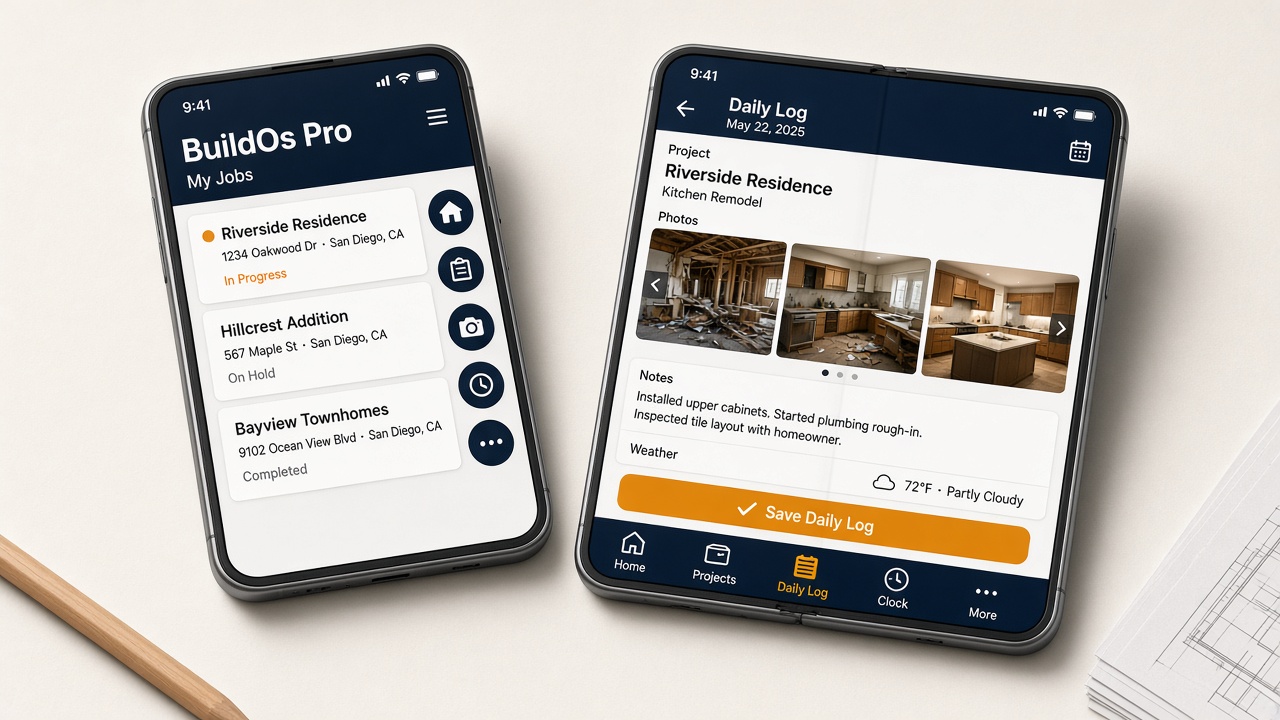
Now on iPhone Duo
Same company, same login — closed or open. Field work stays on the tabs. Everything else is under More. Wide estimating and books stay easier on a laptop.
iPhone Duo is a trademark of Apple Inc. BuildOs Pro is not affiliated with, endorsed by, or sponsored by Apple.
29 seconds · kitchen walk to a real cost-book estimate
New video
Watch a contractor set up a job and write a daily log just by talking to BuildOs. Video on the way.
One click · done · free for the trade
They will not fill out a portal for you. They will tap a text: camera opens, photos save themselves, waiver is a name and a check. That one click writes today’s job update, their scope, and Ready to pay. You already pay for Pro. They never buy a seat.
Photos, insurance, and a waiver used to live in texts. You paid anyway and hoped the proof showed up.
They use it because it puts money in their pocket and proof in their pocket — not because you asked nicely.
Find your path
Deep pages for remodelers, TI shops, accounting firms, investors, WA permits, and how we compare to Jobber and Buildertrend.
Accountants
We assemble. You advise. Free seats, Scan prep, Monitor, partner commissions.
Investors
Download the deck, scan the QR, see the revenue model and diligence path.
Audiences
Remodelers, builders, TI, trades, GC partners, Washington shops.
Compare
Side-by-side pages for the stacks contractors already know.
Guides
Practical how-tos for the spine from walk to bid to permit.
Washington
Local hubs plus Auto Permit on six WA platforms.
Product
Scope to itemized draft your estimators can finish.
Product
Crew schedules that survive weather and change orders.
Invite
They tap the link. Photo writes the update. You see Ready to pay. They never buy a seat.
For trades
Camera opens. Photos save themselves. Get paid faster. Tell the next builder.
Cash flow
Eight cash options while you wait — invoice advance, credit line, loan, payroll, vendor bills, shop card. Apply inside BuildOs Pro.
Marketplace
Get paid now, funding on the estimate, ABC Supply, Thumbtack, QuickBooks. Apply to be listed.
Anti-gouging math
Published competitor rates for a small crew — before their add-ons, per-user meters, and “call sales” markups. BuildOs Pro includes the tools others sell separately.
| Platform | Typical monthly | What you get | The catch |
|---|---|---|---|
| BuildOs Pro Crew · Builder · Scale |
$199–$499flat · live jobs + seats | Full OS + SmartMail + Auto Permit tools + CostPulse estimating + Cost Recovery | Mobile version of the platform on phone and tablet · trades on a link never buy a seat · extra logins $15/mo · no module upsells |
| Jobber Grow team plans |
~$299–$3995–10 users · monthly | Field service CRM / scheduling / invoicing | Price climbs with headcount; AI & marketing add-ons extra; no Cost Recovery |
| CoConstruct Essential / Advanced |
~$339–$499after short intro | Builder / remodeler PM + selections | Intro rates expire; folding into Buildertrend; estimating depth varies by plan |
| Buildertrend volume quote |
~$500–$800+often $8–10k/yr | Full residential builder suite | No published price — sales quote tied to your volume; renewal surprises common |
| Houzz Pro Essential+ |
~$400–$500+annual equiv. | CRM + marketing + project tools | Marketing-led stack; deeper ops often means higher tiers |
| Procore enterprise |
$667+entry · custom above | Enterprise construction management | Built for big GCs — overkill (and overpriced) for most shops |
Competitor figures are approximate public / third-party rates as of 2026 and change without notice. BuildOs prices are the live Stripe rates on this page — always significantly lower, not just for an intro period.
The BuildOs family
Crew, Builder, and Scale all include SmartMail, Auto Permit tools, and CostPulse estimating — no extra monthly fees. Standalone prices are only if you want a single tool without the full OS (or an API-only seat).
The construction operating system — estimating through closeout in one login. Every feature on every tier; you only step up when you need more live jobs at once or more seats. SmartMail, Auto Permit, and CostPulse are included — not add-on invoices.
Job-linked email that becomes living estimate scope. Connect Gmail or Outlook, triage what matters, match to jobs, reply from your real address — then call it from your own CRM later via API.
Auto-draft on all six WA platforms — Seattle SDCI, MyBuildingPermit, Tacoma Accela, eTRAKiT, SmartGov, and EnerGov. Flat monthly, not $25–$100 per filing. City fees stay with the city. You confirm before pay or submit.
Not a click-and-bid app by itself. CostPulse is a cost-intelligence layer for software you already use — via API — or fully inside BuildOs Pro. It learns real unit costs and serves them so pricing isn’t guessed.
SmartMail + Auto Permit together for shops that aren’t ready for the full OS — or want a second seat for the office alone. On Pro you already have both; this bundle is the à-la-carte path.
Pro subscribers: use SmartMail, Auto Permit, and CostPulse inside the app — no separate Stripe add-on. Standalone checkout is for non-Pro buyers. City permit fees are always paid to the jurisdiction.
Nobody else offers this
Contractors already build profit and overhead into every job. Cost Recovery treats your subscription the same way — automatically, on won volume.
Example: 10 estimates/mo · 30% win · $25k average → about $100 per job you win. Shortfalls catch up next month. T&M skipped.
Folded into markup, or shown as Project Administration — never “software fee.”
Starts working day one. Flip off anytime from company settings.
Win-rate aware math with a hard cap so bids never look wrong.

Why BuildOs exists
I’ve paid the inflated software bills, the nickel-and-dime add-ons, the “loyalty” renewals that only go up. BuildOs is the anti-gouging answer: multiple products, lean overhead, prices that stay significantly lower — not for a honeymoon month, for good.
— Roy Dean, founder · BuildOs Pro
Create your account → pick Crew, Builder, or Scale → 30 days free, no card required. You only pay when the free month ends and you choose to become a BuildOs member. We never store credit cards or payment methods in BuildOs Pro. Auto Permit (6 platforms), SmartMail, and CostPulse are included on every Pro plan.
Contractor cash · all 50 states
In this economy, Net 30 is often 60 or 90. Payroll is still Friday. BuildOs Pro puts eight cash options on the job you already run so approved shops can access money today — instead of waiting on someone else's accounts payable. Apply in the app. First 30 days free, no card.
The GC or commercial owner has the work. You have the invoice. They pay in 30, 60, 90 days — and Friday payroll does not wait. Advance that unpaid bill so cash hits the shop now, while the receivable is still sitting.
You bill homeowners. Their invoice is not a typical business receivable. A revolving line underwrites your shop — bank, books, revenue — so you can draw when materials, labor, or a slow month hit. Draw, repay, draw again.
One lump sum. Fixed payments. Use it for a truck, a crew you cannot float, or the gap between a finished job and the next deposit. You know the payment before you take the money.
The book is full. The account is tight. Take money now against work you are about to bill, and repay as a share of sales as jobs close — not a rigid calendar that ignores how construction actually pays.
The supplier or materials PO is due before the client pays you. Cover that bill so you do not drain the account, miss a materials window, or stall a crew that is ready to work.
Friday is Friday. The receivable lands next month. Make payroll on time so the crew stays, the job keeps moving, and you are not writing a personal check to float someone else's delay.
A GC or commercial buyer wants Net 30 or Net 60. You still get paid. They pay later. This is not the same as homeowner monthly plans on the estimate — that is how the client pays you. This is how you stay whole when a business customer needs time.
A card for materials and job expenses, repaid on your cash cycle — not a personal card that mixes the house with the company. Keep job spend on the job.
See us on Google Play and the Apple App Store
BuildOs Pro supports phones and tablets with a mobile version of the platform. Android crews install it from Google Play and iPhone crews from the App Store — same jobs as the office. No extra app fee. Invite a trade from the job: they tap a link, the camera opens, and waiver + photos means ready to pay. They never buy a seat.
 Android · Google Play
 iPhone · App Store
Research before you decide
Want another perspective before starting your free trial? Explore our product listing on Software Advice, an independent software discovery website.
View our Software Advice listing ↗A marketplace listing is not an endorsement or award. Please refer to our website for current subscription pricing: Crew $199, Builder $299, Scale $499 per month.